- Published on
LangGraph Conversational Agent: Memory, Summarization and Real-Time Tools
- Authors

- Name
- Yassine Handane
- @yassine-handane
NB06 - Conversational Agent with Memory and Tools
What it is
A production-ready conversational agent built with LangGraph that combines short-term memory (checkpointing) and long-term memory (conversation summarization) with real-world tool access.
What problem it solves
A standard LLM call is stateless: it has no memory between turns and no access to real-time information. This notebook assembles all the building blocks from NB01-NB05 into a single coherent system that:
- Remembers the full conversation history across multiple invokes (checkpointing)
- Compresses old context into a summary when the conversation grows too long (summarization)
- Fetches real-time data via custom tools (weather, web search)
How it connects to the previous notebooks
- NB04:
@tool,bind_tools, ReAct loop pattern - NB05:
StateGraph,MessagesState,MemorySaver,tools_condition,ToolNode
Architecture
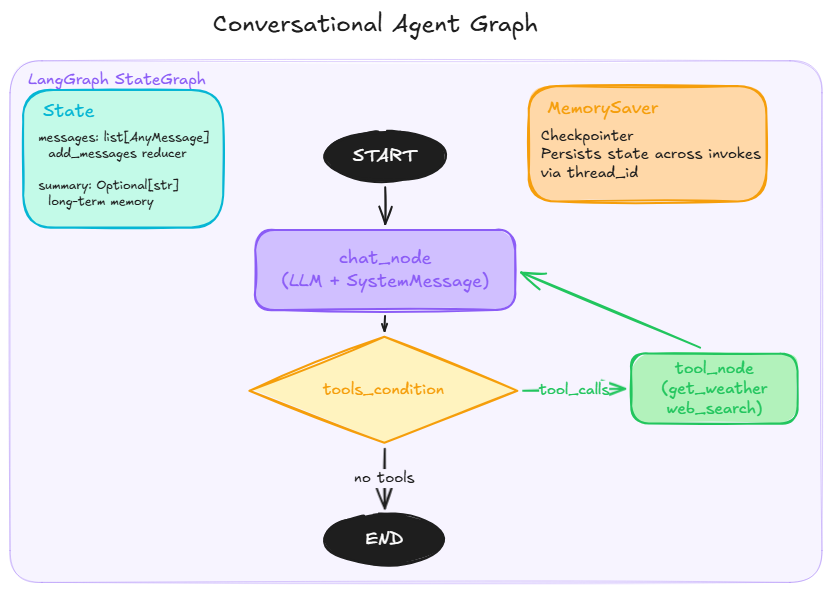
START --> chat_node --> tools_condition --> tool_node --> chat_node
                    --> END
State: messages (add_messages reducer) + summary (long-term memory)
Diagrams:
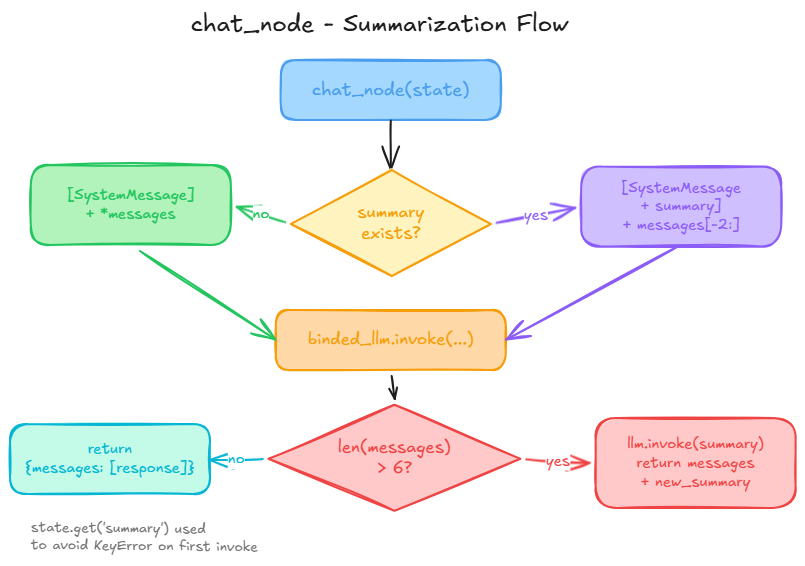
graph_architecture.pngandsummarization_flow.png
Section 1 - Setup
!pip install langgraph langchain_core langchain[openai] tavily --quiet
from langgraph.graph import START, END, StateGraph, MessagesState
from langgraph.checkpoint.memory import MemorySaver
from langgraph.prebuilt import ToolNode, tools_condition

from langchain_openai import ChatOpenAI
from langchain_core.tools import tool
from langchain_core.messages import HumanMessage, SystemMessage

from typing import Optional
import requests
import os
from tavily import TavilyClient
OPENROUTER_API_KEY = os.environ["OPENROUTER_API_KEY"]
TAVILY_API_KEY = os.environ["TAVILY_API_KEY"]
OPENWEATHER_API_KEY = os.environ["OPENWEATHER_API_KEY"]
llm = ChatOpenAI(
    api_key=OPENROUTER_API_KEY,
    base_url="https://openrouter.ai/api/v1",
    model="arcee-ai/trinity-large-preview:free"
)

tavily_client = TavilyClient(api_key=TAVILY_API_KEY)
Section 2 - Tools
What they are
Tools are Python functions decorated with @tool that the LLM can call autonomously to access real-world data.
Key insight
The tool is responsible for data retrieval only. The LLM is responsible for reasoning on that data. A tool should always return a clean, readable string, not a raw dict or a blob of JSON.
@tool
def get_weather(location: str) -> str:
    """Return current weather information for a given city."""
    response = requests.get(
        "https://api.openweathermap.org/data/2.5/weather",
        params={"q": location, "appid": OPENWEATHER_API_KEY, "units": "metric"}
    )
    weather = response.json()
    return (
        f"temperature: {weather['main']['temp']}C, "
        f"humidity: {weather['main']['humidity']}%, "
        f"description: {weather['weather'][0]['description']}, "
        f"wind speed: {weather['wind']['speed']} m/s"
    )
@tool
def web_search(query: str) -> str:
    """Search the web for current information the LLM does not have access to."""
    response = tavily_client.search(query)
    return "\n\n".join(
        f"Title: {r['title']}\nURL: {r['url']}\n{r['content']}"
        for r in response["results"]
    )
# bind_tools creates a new LLM object augmented with tool schemas.
# The original llm object is unchanged (same pattern as with_structured_output).
binded_llm = llm.bind_tools([get_weather, web_search])
Section 3 - State
What it is
The state is a TypedDict schema that defines what data flows through the graph at every step.
How it connects to the previous step
MessagesState is a shortcut provided by LangGraph that already includes messages: Annotated[list, add_messages]. We extend it with a custom summary field for long-term memory.
Key insight
Always use state.get('key') instead of state['key'] for custom fields. LangGraph does not initialize custom keys until a node explicitly returns them, so direct access raises a KeyError on the first invoke.
class State(MessagesState):
    summary: Optional[str] = None
Section 4 - Nodes
What they are
Nodes are Python functions that take the current state as input and return a partial dict to update the state.
Summarization logic
When len(messages) > 6, the node generates a summary of the full conversation history and returns it alongside the response. On the next invoke, the summary is injected into the SystemMessage and only the last 2 messages are sent to the LLM, keeping the context window bounded.
See
summarization_flow.pngfor the full decision flow.
Diagram
def chat_node(state: State) -> dict:
    summary = state.get("summary")

    if summary:
        # Inject existing summary into system prompt and send only the last 2 messages
        system_prompt = [
            SystemMessage(
                f"You are a helpful assistant. Answer questions in a witty manner. "
                f"Previous conversation summary: {summary}"
            )
        ] + state["messages"][-2:]
        response = binded_llm.invoke(system_prompt)
    else:
        response = binded_llm.invoke(
            [SystemMessage("You are a helpful assistant. Answer questions in a witty manner."),
             *state["messages"]]
        )

    # Summarize when conversation exceeds threshold
    if len(state["messages"]) > 6:
        new_summary = llm.invoke(
            f"Based on this conversation: {state['messages']} - generate a concise summary."
        ).content
        return {"messages": [response], "summary": new_summary}

    return {"messages": [response]}


tool_node = ToolNode([get_weather, web_search])
Section 5 - Graph
What it is
StateGraph is a builder object. compile() produces a CompiledStateGraph which is a Runnable.
How it connects to the previous step
tools_condition is a prebuilt conditional function that inspects the last AIMessage: if it contains tool_calls, it routes to tool_node; otherwise it routes to END.
Key insight
The MemorySaver checkpointer persists the full state (including summary) between invokes. Each conversation is identified by a unique thread_id passed in the config.
Diagram
builder = StateGraph(State)

builder.add_node(chat_node)
builder.add_node(tool_node)

builder.add_edge(START, "chat_node")
builder.add_conditional_edges("chat_node", tools_condition)
builder.add_edge("tools", "chat_node")

graph = builder.compile(checkpointer=MemorySaver())
graph
Section 6 - Demos
Demo 1 - Tool calling and conversational memory
config = {"configurable": {"thread_id": "demo-1"}}

# Turn 1: weather tool is called
result = graph.invoke(
    {"messages": [HumanMessage("What's the weather in Paris?")]},
    config=config
)
print(result["messages"][-1].content)
# Turn 2: no location provided, agent uses conversational memory
result = graph.invoke(
    {"messages": [HumanMessage("Should I take an umbrella?")]},
    config=config
)
print(result["messages"][-1].content)
Demo 2 - Summarization trigger
After 6 messages, the agent automatically generates a summary of the conversation and stores it in state['summary']. Subsequent invokes use this summary instead of the full history, keeping the context window bounded.
config = {"configurable": {"thread_id": "demo-2"}}

messages = [
    "What's the weather in Paris?",
    "Should I take an umbrella?",
    "What are the latest AI news?",
    "Who is the CEO of OpenAI?",
    "What's the weather in London?",
    "Tell me about LangChain",
    "What's the weather in Tokyo?",
]

for msg in messages:
    result = graph.invoke(
        {"messages": [HumanMessage(msg)]},
        config=config
    )
    print(f"Q: {msg}")
    print(f"A: {result['messages'][-1].content}")
    print("---")
# Inspect the generated summary stored in the state
state = graph.get_state(config)
print("Summary:")
print(state.values.get("summary"))